How to Use a KitchenAid Pasta Roller Attachment
To use a KitchenAid pasta roller attachment, fit it to the mixer's power hub, start with a flattened piece of rested dough, and pass it through the widest roller setting first. Reduce the setting gradually until the dough reaches the thickness you want.
On this page (7 sections)
- How do you set up a KitchenAid pasta roller attachment?
- How do you feed dough through the roller?
- How do you cut the pasta sheet?
- What should you do if dough sticks or tears?
- How should you clean and store the roller?
- Which mixer tasks pair well with fresh pasta?
- How to use a KitchenAid pasta roller attachment successfully
To use a KitchenAid pasta roller attachment, connect it to a compatible mixer's power hub, flatten rested dough, and feed it through the widest setting first. Step the roller down gradually to make a thinner sheet, then use a compatible cutter if you want noodles in a specific shape.
Check the instructions for your exact mixer and attachment before starting. Roller settings, speed guidance, cleaning steps, and compatibility can vary by model.
How do you set up a KitchenAid pasta roller attachment?
Secure the attachment to the mixer's power hub before switching the mixer on. Keep the mixer unplugged while fitting or removing an attachment, and follow the steps in both manuals.
Clear enough counter space to catch the dough sheet as it comes out. Set a lightly floured work surface nearby, and divide the dough into pieces that you can guide without stretching.
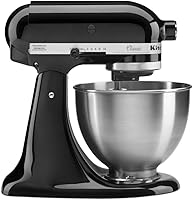
The KitchenAid Classic Series 4.5 Quart Tilt-Head Stand has a power hub designed to run optional attachments, including pasta makers. Its tilt-head design also gives access to the bowl while you prepare dough.
The attachment needs a compatible stand mixer; a hand mixer cannot turn its rollers. For other ways a stand mixer can help with kitchen tasks, see what you can make with a stand mixer.
How do you feed dough through the roller?
Start at the widest roller setting and feed the dough through smoothly. Keep your fingers, clothing, and utensils clear of the moving rollers.
Flatten one piece of dough enough to enter the roller without forcing it. Support the sheet as it exits so it doesn't drag across the counter or fold under its own weight.
If the dough comes out uneven, fold it into a manageable shape and pass it through again at the same setting. Dust lightly with flour if the dough feels sticky, while avoiding excess flour that could make it harder to handle.
How do KitchenAid pasta roller settings work?
Each setting changes the gap between the rollers, so lower settings generally make a thinner sheet. Begin with the widest opening and reduce the setting gradually.
The dial numbers and the thickness each one produces depend on the attachment model. Use its manual for the setting sequence and for the final thickness your recipe needs.
Don't skip several settings if the dough is still thick or uneven. Gradual passes give you more control and help avoid tearing the sheet.
How do you cut the pasta sheet?
Once the sheet reaches the thickness you want, cut it with a compatible pasta cutter or by hand. Follow the instructions for any cutter attachment you use, since its setup and operation may differ from the roller.
Keep the sheet lightly dusted and lay it flat or drape it as the attachment instructions allow. Cut manageable lengths so the pasta is easier to handle and cook.
A roller makes sheets for several pasta shapes, while a cutter determines the noodle width. Read what you can make with a pasta roller attachment for ideas on using those sheets.
What should you do if dough sticks or tears?
Pause the mixer and correct the dough before feeding it again. Check whether the sheet is too sticky, too dry, too wide, or being fed at an angle.
Lightly flour the dough and work surface if needed. If the sheet tears, bring it together gently and start again at a wider setting rather than pulling it through.
Never reach into moving rollers to free dough. Switch off the mixer first, then follow the attachment's instructions for clearing or removing dough.
How should you clean and store the roller?
Clean the attachment only as its manual directs, and don't immerse it unless the instructions say that is safe. Remove loose dough as directed and let the attachment dry fully before storing it.
Avoid using sharp tools that could damage the rollers. Keep the attachment away from moisture and store it where the rollers won't be knocked or bent.
Which mixer tasks pair well with fresh pasta?
A stand mixer can prepare dough and run compatible attachments, while the pasta roller handles shaping. Check your recipe and attachment instructions to see which steps each tool can do.
The Hamilton Beach 6-Speed Electric Hand Mixer is for mixing and whisking with its included beaters and whisk. It doesn't have a stand mixer's power hub, so it can't operate a KitchenAid pasta roller.
For a different mixer task, this KitchenAid mixer mashed potatoes guide shows how a stand mixer can handle a side dish. You can also browse KitchenAid stand mixer uses for more ideas.
The KitchenAid Ice Cream Maker Attachment is designed for making ice cream, gelato, or sorbet with a compatible stand mixer. For another mixer task, see how to use a KitchenAid grinder attachment.
It serves a different job from a pasta roller, so consider it only if frozen desserts are also on your list.
If you're comparing roller options before choosing one, see the best pasta roller attachment for a KitchenAid stand mixer. For meal planning more broadly, the best stand mixer for meal prep may help you compare what a mixer can do.
How to use a KitchenAid pasta roller attachment successfully
For how to use a KitchenAid pasta roller attachment, fit it securely, start at the widest setting, and make gradual passes until the sheet is thin enough for your recipe. Choose a compatible cutter for the shape you want, and use the exact instructions for your attachment and mixer to guide speed, cleaning, and care.
Frequently asked questions
What setting should I use first on a KitchenAid pasta roller?
Start with the roller at its widest setting, which is usually the lowest number on the dial. Feed in a flattened piece of rested dough, then fold and pass it through again if it needs shaping.
Reduce the setting one step at a time until the sheet is thin enough for your recipe.
What speed should a KitchenAid mixer use with a pasta roller?
Use the speed recommended in the instructions for your specific roller attachment. Attachments and mixer models can differ, so check both manuals before connecting or operating them, and keep hands and utensils away from the roller while it runs.
Do you need a stand mixer to use a pasta roller attachment?
The KitchenAid pasta roller attachment connects to a compatible KitchenAid stand mixer power hub. A hand mixer does not have that hub, so it can't drive this attachment.
If you have a different roller, follow its maker's compatibility and operating instructions.
How do you keep pasta dough from sticking to the roller?
Keep the dough lightly floured and handle it in manageable pieces, following the attachment's care and use instructions. If dough sticks or tears, pause and adjust the dough before continuing; don't pull it through by force or put fingers near the rollers.