How to Use a Marcato Atlas 150 Pasta Machine
To use a Marcato Atlas 150, clamp it to a stable counter, roll dough through the widest setting first, then reduce the thickness one step at a time before cutting. Let the pasta dry briefly and clean the machine with a dry brush.
On this page (9 sections)
- What do you need before using a Marcato Atlas 150?
- How do you attach and secure the Atlas 150?
- How do you prepare dough for the first pass?
- How do you use the Marcato Atlas 150 thickness settings?
- How do you cut the rolled sheet?
- How do you make ravioli with an Atlas 150?
- How do you keep pasta from sticking?
- How do you clean a Marcato Atlas 150?
- What should you remember when using a Marcato Atlas 150?
To use a Marcato Atlas 150 pasta machine, secure it to a stable counter, start with the widest roller setting, and pass the dough through several times before thinning it gradually. Once the sheet reaches the thickness your recipe needs, guide it through the cutter for fettuccine or tagliolini.
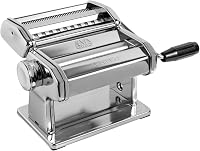
The Atlas 150 is a manual machine with 10 settings. It makes pasta sheets up to 150 mm wide, with a listed thickness range from 0.8 to 4.8 mm.
That width suits a standard home counter and a small work area. It lets you roll a sheet for lasagna, fettuccine, or tagliolini without needing a large table.
The manual operation suits cooks who want control over speed and thickness. You turn the crank, guide the dough, and decide when to move to the next setting.
Starting wide helps smooth the dough before you thin it, which reduces tearing and uneven edges. This setup suits home cooks who make fresh pasta in modest batches and rewards patience more than speed.
Plan your workspace before you begin. You need room for the machine, the incoming dough, and the sheet as it leaves the rollers.
Keep the dough in small pieces so it stays easy to guide. Large pieces are harder to support and more likely to fold or stretch.
Flour the surface lightly and keep the sheet moving at a steady pace. A calm rhythm helps the rollers feed the dough evenly through the machine.
Once the sheet looks smooth and even, you can cut it. Feed it straight into the cutter and separate the noodles as they come out.
What do you need before using a Marcato Atlas 150?
Before using a Marcato Atlas 150, prepare a firm counter, the black crank handle, a lightly floured work surface, and dough cut into manageable pieces. Keep a knife or bench scraper nearby for dividing dough and trimming uneven edges.
The machine is 8 x 8 x 7 inches and weighs 2.6 kg. Leave enough room on both sides for a long sheet of dough, plus a tray or clean surface where the rolled pasta can rest.
If you are still choosing a machine, our guide to pasta maker machines explains the differences between manual rollers, cutters, and motor-ready models.
Which pasta machine suits this setup?
The MARCATO Atlas150 Manual Pasta Maker Machine-LASAGNA is the closest match for readers who want the specific Atlas 150 setup. It includes the pasta maker and black crank handle, and its built-in rollers make lasagna sheets, fettuccine, and tagliolini.
The CucinaPro Pasta Maker Deluxe Set- Stainless Steel suits readers who want a manual machine with more included cutting options. Its 3 interchangeable attachments make 5 pasta types, including lasagnette, fettuccine, angel hair, spaghetti, and ravioli.
Choose based on the kind of pasta you plan to make most often. The Atlas 150 focuses on its model-specific roller and cutter system, while the CucinaPro set emphasizes multiple attachments in one package.
How do you attach and secure the Atlas 150?
Place the Atlas 150 at the counter edge, fit its table clamp, and tighten it until the machine stays still. Attach the crank handle before feeding dough through the rollers.
The clamp needs a firm surface with enough clearance below the counter. Avoid a loose, rocking setup because the dough can pull the machine forward as it enters the rollers.
Turn the crank slowly at first. Keep one hand on the dough and one on the crank so the sheet enters straight rather than folding against the roller.
The Atlas 150 has a manual operating mode. If you want powered rolling, read how to choose a pasta machine motor before adding a motor, and confirm that the attachment and machine combination is suitable.
How do you prepare dough for the first pass?
Divide the dough into small pieces and flatten each piece by hand before the first pass. A thick, uneven lump can enter crookedly and produce a sheet with folds or thick edges.
Dust the dough lightly if it feels sticky, but avoid adding so much flour that the surface becomes dry and difficult to seal. Keep unused dough covered while you work so it does not form a dry skin.
Set the adjustment dial to the widest opening. Feed one end into the rollers while turning the crank steadily, then catch the sheet as it comes through.
If the sheet is uneven, fold it and pass it through again at the same wide setting. Work until the dough becomes smoother and more regular before moving to a thinner setting.
How do you use the Marcato Atlas 150 thickness settings?
Reduce the setting one step at a time and support the sheet as it lengthens. The Atlas 150 has 10 settings, so gradual changes give you more control than trying to jump from thick dough to a very thin sheet.
After each pass, guide the dough through without pulling hard. Long sheets can stretch under their own weight, so support them with your free hand or let them rest on a clean, lightly floured surface.
The correct thickness depends on the pasta shape. A thicker sheet can suit lasagna or filled pasta, while a thinner sheet may work better for delicate cut noodles.
Use the recipe as your final guide rather than treating one dial number as universal.
The Atlas 150's listed range is 0.8 to 4.8 mm. That range describes the machine's roller openings, not a guarantee that every dough recipe will behave the same way at every setting.
How do you cut the rolled sheet?
Let the sheet reach an even thickness before guiding it through the built-in cutter. Feed the sheet straight, turn the crank at a steady pace, and catch the noodles as they separate.
The Atlas 150 model is described as making lasagna, fettuccine, and tagliolini. Keep the cut pasta lightly floured and separated so strands do not stick together.
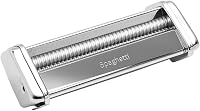
If you want different shapes, check the best Marcato Atlas 150 attachments before choosing an accessory. Attachments are useful only when they match the Atlas 150 system and the pasta style you plan to make.
For a broader comparison of hand-crank models, see the best manual pasta makers. It can help if you are deciding between the Atlas 150 and another manual roller.
How do you make ravioli with an Atlas 150?
Roll a smooth pasta sheet first, then use a compatible ravioli attachment to form and cut filled pasta. Add filling in controlled portions so the dough can seal around each piece.
The Marcato Ravioli 150 Attachment for Atlas is made for the Atlas 150 pasta machine. It has aluminum rollers, installs on the Atlas system, and forms and cuts dough into ravioli.
The attachment is manual and has 1 setting. Its instructions say not to use it with a motor, so keep the hand crank in place when making ravioli.
Do not wash the attachment with water or put it in a dishwasher. Let residue dry, then clean it with a brush or wooden rod.
How do you keep pasta from sticking?
Use light flouring, avoid piling warm sheets together, and separate cut noodles soon after cutting. Too much flour can affect the dough, but too little can make fresh pasta cling to itself.
Lay sheets or noodles in a loose layer on a clean surface. If you need to stack them, dust lightly between layers and avoid pressing them together.
Light flouring works best when it is added in stages. Dust the dough before rolling, then add a little more only where strands start to touch.
Warm sheets need more space than cool sheets. Heat makes fresh dough more tender, so piling it early can press the surface and cause sticking.
Cut noodles should be separated soon after they leave the cutter. A quick lift and shake helps air reach each strand before it settles.
For sheets, keep each one flat and supported. Letting a long sheet hang or fold under its own weight can crease it and make the next step harder.
Keep seams clean for filled pasta. Brush away loose flour and filling from the edge so the dough can meet and seal properly.
Work in small batches if sticking becomes a problem. A short pause to dust, separate, and lay out the pasta often saves more time than fixing a stuck sheet later.
How do you clean a Marcato Atlas 150?
Let dough residue dry for about 30 minutes, then remove it with a dry cleaning brush. Do not rinse the machine or place it in a dishwasher.
Brush around the rollers and cutters once the dough is dry enough to flake away. A wooden rod can help remove small pieces from narrow areas without adding water.
The Atlas 150 uses chrome steel, nickel-plated steel, chrome-plated steel, and ABS components. Its care instructions favor dry cleaning, so keep the machine dry after every use.
The Marcato ravioli attachment also calls for a brush or wooden rod rather than water. Clean it before storing so dried dough does not remain around the rollers.
What should you remember when using a Marcato Atlas 150?
The basic method is simple: secure the machine, begin at the widest setting, smooth the dough through repeated passes, reduce thickness gradually, and cut only after the sheet is even.
Choose the Atlas 150 for its 10-setting manual roller and 150 mm pasta width. Choose the CucinaPro set if the included attachments and 5 pasta types better match your cooking plans.
Add the Marcato Ravioli 150 attachment when filled pasta is the main reason you want an accessory.
For readers comparing mixer-based options, our guides to the Best Stand Mixer Under 150 dollars and Best Stand Mixer For Pasta Dough cover a different way to prepare dough before rolling.
Frequently asked questions
How do you use a Marcato Atlas 150 pasta machine?
Clamp the Marcato Atlas 150 to a stable counter, attach the black crank handle, and set the adjustment dial to the widest opening. Flatten a small piece of dough, feed it through while turning the crank, fold and repeat if needed, then reduce the setting gradually before using the cutter.
What thickness setting should you use on a Marcato Atlas 150?
Start at the widest setting and reduce the opening step by step until the sheet suits your recipe. The Marcato Atlas 150 has 10 settings, from a minimum sheet thickness of 0.8 millimeters to a maximum of 4.8 millimeters, so the right setting depends on the pasta shape and sauce.
Can you use a motor with a Marcato Atlas 150?
The Marcato Atlas 150 is a manual machine and includes a black crank handle. Its product information also identifies compatibility with the separately available Pastadrive Motor, but the ravioli attachment should not be used with a motor.
How do you clean a Marcato Atlas 150?
Let the machine sit for about 30 minutes so dough residue can dry, then remove it with a dry cleaning brush. The Marcato Atlas 150 is not dishwasher safe, so don't wash the machine with water or place it in a dishwasher.