How to Choose a Motor for a Pasta Machine
Choose a pasta machine motor only after confirming the exact machine, mounting method and power requirements. A motor that fits one pasta maker may not fit another, so match the drive connection before considering speed or convenience.
On this page (11 sections)
- How to Choose a Motor for a Pasta Machine
- Does your pasta machine support a motor?
- How do you check motor compatibility?
- What power requirements should you compare?
- How does a motor change pasta-making technique?
- Which pasta maker works with the motor you are considering?
- What should you inspect before installation?
- What should you do if the motor does not fit?
- Should you choose a motor or keep the hand crank?
- How should you plan a motorized pasta station?
- What is the final pasta machine motor decision rule?
How to Choose a Motor for a Pasta Machine
Choose a pasta machine motor by matching the motor to the machine model first, then checking mounting, drive connection, voltage, controls and attachment limits. The right setup reduces hand cranking, but a motor is only useful when it fits securely and works with the pasta shapes you plan to make.
Motorized operation can help when you roll several sheets in one session or want both hands free for feeding and catching dough. It doesn't turn an incompatible manual machine into a powered one, so the machine and motor should be treated as one matched system.
If you are still choosing the machine itself, start with our pasta maker machine buying guide. It explains the basic differences between manual machines, attachments and powered operation.
Does your pasta machine support a motor?
The first question is whether the machine is designed for a motor at all. Look for a named motor accessory from the machine brand, an approved model list or clear instructions for replacing the hand crank with a drive unit.
A motor made for one brand may use a different shaft, bracket, gear or control connection from another brand. Similar-looking pasta machines can still have different mounting points, so do not choose by appearance alone.
The MARCATO Atlas150 Manual Pasta Maker Machine is specifically described as compatible with the separately available Pastadrive Motor. That gives Atlas 150 owners a clear starting point, but you should still confirm the exact machine version and motor connection before ordering.
For more Atlas setup guidance, read how to use a Marcato Atlas 150 pasta machine. The correct machine setup matters before you add powered operation.
How do you check motor compatibility?
Check compatibility in this order: brand and model, drive connection, mounting method, attachment limits and electrical requirements. Each check prevents a different type of mismatch.
Match the brand and model
Write down the full name and model number of your pasta machine. For example, the Atlas 150 name identifies a specific Marcato machine family, while a generic phrase such as “manual pasta maker” is not enough to choose a motor.
Search for a motor that names your exact machine rather than one that simply claims to fit pasta makers. If the manufacturer names a separate motor accessory, use that product family as the reference point.
The CucinaPro Pasta Maker Deluxe Set is a manual machine with a hand crank, table clamp and 3 attachments. Its data does not guarantee compatibility with a motor, so do not assume that a third-party motor will fit it.
Check the drive connection
A motor must connect to the part that normally turns the rollers. That may involve removing the hand crank and fitting the motor in its place, but the exact method depends on the machine and motor design.
Check whether the motor requires a specific shaft shape, adapter or locking point. A motor that spins but does not lock firmly to the machine can slip, damage the connection or create an uneven feed.
Do not force a motor onto a crank socket. If the connection needs pressure, modification or a homemade adapter, stop and verify the setup with the manufacturer first.
Confirm how the motor mounts
A stable motor needs more than a matching connector. Check whether it clips to the machine, attaches to a bracket or requires a particular base position.
The machine should remain steady while dough passes through the rollers. A table clamp can help secure a manual machine, but you should not assume that the clamp also supports the weight or movement of a motor.
Read the motor instructions for clearance around the drive and controls. Keep the cord, switch and moving parts away from the dough path.
What power requirements should you compare?
Compare voltage, plug type, power rating, duty guidance and controls before connecting a pasta machine motor. These details tell you whether the motor can operate in your kitchen and how it is meant to be used.
Voltage must match your electrical supply. A plug adapter can change the plug shape, but it does not automatically change voltage or make an incompatible motor safe.
A power rating can help you compare motors, but it is not a complete compatibility test. The motor still needs the correct drive connection, mounting system and approved machine pairing.
Look for guidance about continuous operation, pauses and load limits. Pasta dough can become firm, and forcing the rollers or running the motor longer than recommended can put stress on the drive system.
Choose controls that you can reach without placing your hands near the rollers. A clear power switch makes it easier to stop the motor if dough folds, sticks or feeds unevenly.
How does a motor change pasta-making technique?
A motor changes the task from turning a crank to feeding and guiding the dough at a steady pace. You still need to prepare the dough, set the roller thickness and manage the sheet as it exits.
Start with a small piece of dough that is ready for rolling. Keep the sheet aligned with the rollers, and support the emerging dough so its weight does not pull the sheet sideways.
Do not push dough into the rollers with your fingers. If the sheet bunches, stop the motor before clearing the dough and check whether the dough is too soft, too large or poorly aligned.
Use the slowest practical setting when learning the machine and motor together. A steady feed gives you more time to notice tearing, folding or flour buildup.
A powered machine also needs a clear work area. Place a tray, board or drying setup where the sheet can land without catching on the motor, cord or nearby utensils.
Which pasta maker works with the motor you are considering?
The best match is the machine with documented motor compatibility and a connection that needs no improvised changes. The three products below show why the machine, attachment and motor should be considered together.
MARCATO Atlas150 Manual Pasta Maker Machine-LASAGNA, FETTUCCINE & TAGLIOLINI. Made in Italy
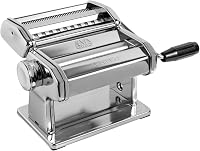
The MARCATO Atlas150 is the clearest motor candidate here because its product information names compatibility with the separately available Pastadrive Motor. It is a manual machine with a black crank handle, 10 settings and 3 discs.
It makes lasagna, fettuccine and tagliolini, with a maximum sheet thickness of 4.8 mm and a minimum thickness of 0.8 mm. The machine is made from chrome steel, nickel-plated steel, chrome-plated steel and ABS, and it is made and assembled in Italy.
The Atlas 150 produces sheets up to 150 mm, or 6 in, wide. That width helps you plan the board or tray beside the machine before you begin.
The included components are the pasta maker and black crank handle. If you motorize it, the motor becomes part of the operating setup, so keep the hand crank stored safely for manual use if the motor is removed.
Marcato's product information also says the machine is not dishwasher safe. Let dough residue dry for 30 minutes, then remove it with a dry cleaning brush.
Marcato Ravioli 150 Attachment for Atlas 150 Pasta Machine
The Marcato Ravioli 150 Attachment is for forming and cutting ravioli with the Atlas 150, but its instructions say not to use it with the motor. That limitation is essential when planning a powered pasta setup.
The attachment has chrome-plated steel and ABS rollers with aluminum and stainless steel blade materials. It is made in Italy and installs on the Atlas 150 for homemade filled pasta.
The attachment is a focused accessory rather than a general motor solution. If ravioli is your priority, plan the workflow around manual operation for this attachment, then return to the approved motor setup for compatible rolling and cutting work.
Clean it with a brush or wooden rod. Do not wash it with water or place it in a dishwasher.
For other Atlas accessories, see our best Marcato Atlas 150 attachments. That guide can help you separate accessories designed for the machine from accessories that change how the machine may be used.
What should you inspect before installation?
Inspect the machine, motor and work surface before connecting anything. The drive should turn freely, the machine should sit securely and the motor should have room to operate without cord strain.
Check the crank socket or drive point for dried dough, flour or damage. A clean connection is easier to seat correctly than one with residue around the moving parts.
Set the machine on a stable counter. If your machine uses a clamp, tighten it according to the machine instructions, then test for movement before attaching the motor.
Keep the motor away from water and wet hands. Pasta dough can be sticky, but the motor and electrical connection should remain dry during setup and cleaning.
Route the cord away from the roller opening and the edge of the counter. Leave enough slack for normal movement without creating a loop that can catch on the machine.
Run the motor briefly without dough if the instructions allow it. Listen for unusual noise, watch for wobbling and stop if the connection slips or the machine shifts.
What should you do if the motor does not fit?
Stop and verify the machine model instead of modifying the connection. A motor that does not seat firmly is not a safe motor choice, even if its voltage and power appear suitable.
Check the manufacturer's compatibility list and the motor instructions. Look for a missing adapter, an incorrect machine version or an attachment that must be removed before operation.
Do not drill the housing, bend a shaft or use tape to hold a motor in place. These changes can affect alignment and may damage the machine.
If the motor fits the machine but the dough does not feed smoothly, stop the motor first. Reduce the dough portion, check the roller setting and make sure the sheet enters straight.
When the question is about a Marcato Atlas 150, use Marcato's official support and product information as the final reference for the Pastadrive connection. Compatibility can depend on the exact accessory and machine version.
Should you choose a motor or keep the hand crank?
Choose a motor when your machine has documented compatibility, you roll enough pasta to value powered operation and you can keep the motor and dough path stable. Keep the hand crank when you use an incompatible accessory, make small batches or want the simplest setup.
A motor can reduce repetitive cranking during long rolling sessions. It does not replace dough preparation, thickness adjustments, sheet support or cleaning.
Manual operation gives you direct control over the pace and works with accessories that may not support motor use. The Marcato Ravioli 150 Attachment is a clear example because its instructions say not to use it with the motor.
If you prefer a simpler manual workflow, compare our best manual pasta maker options. A hand crank can be the better choice when flexibility matters more than speed.
How should you plan a motorized pasta station?
Plan the station around machine stability, sheet space and access to the controls. The motor should not force you to twist the machine or reach across moving rollers.
Leave space on the exit side for a long pasta sheet. Put a board, tray or clean surface there before starting so you are not trying to move equipment while dough is feeding.
Keep flour, a dry brush and a scraper within reach, but away from the motor and cord. Dry tools are easier to use when you need to clear dough or clean the machine after a session.
Store removable parts together. If you switch between manual and motorized operation, keep the hand crank, motor and attachment instructions where you can identify them quickly.
A stand mixer can help with dough preparation, but it is a separate job from rolling and cutting. If you are comparing equipment for pasta dough, see the best stand mixer for pasta dough.
For a budget mixer option, read Best Budget Stand Mixer.
Bread-machine comparisons may also appear during kitchen equipment research, but a bread maker does not replace a pasta machine motor. Our Zojirushi Supreme vs Virtuoso comparison covers a different type of appliance.
What is the final pasta machine motor decision rule?
Pick a brand-approved pasta machine motor when the exact machine, drive connection, mount and electrical requirements all match. The Marcato Atlas 150 is the strongest match in this group because its information names the Pastadrive Motor, while the Ravioli 150 Attachment must be used without the motor.
Pick a manual setup when compatibility is unclear or when your preferred attachment has a motor restriction. Confirm the model before ordering, keep the machine stable, and never force a connection that does not seat cleanly.
A pasta machine motor should make an already suitable machine easier to use. It should not decide which machine or attachment you buy.
Frequently asked questions
Can you add a motor to any pasta machine?
No. A motor must match the pasta machine's drive connection, mounting points and operating requirements.
Check the machine and motor brands, model names and current compatibility information before buying.
What motor fits a Marcato Atlas 150?
The Marcato Atlas 150 is compatible with the separately available Pastadrive Motor, according to Marcato's product information. Confirm the exact Atlas 150 version and motor fit before ordering, especially if your machine has an attachment installed or you plan to use a special accessory.
Does a pasta machine motor need a lot of power?
A pasta machine motor needs enough power for the machine's rollers and the dough you plan to process, but a larger power number alone does not confirm compatibility. Check the motor's voltage, connection, duty guidance and approved machine list before comparing power.
Can a motor run a ravioli attachment?
Do not assume it can. The Marcato Ravioli 150 Attachment is described for use with the Atlas 150 and its instructions say not to use it with the motor.