How to Use a Philips Pasta Maker
To use a Philips pasta maker, measure the ingredients, choose a disc, start the automatic program, and add liquid slowly as the machine mixes. Let the pasta extrude, cut it to length, then clean the removable parts after use.
On this page (9 sections)
- What do you need before using a Philips pasta maker?
- How do you choose and install a pasta disc?
- How do you start the Philips pasta-making cycle?
- How should you clean a Philips pasta maker?
- Which Philips pasta maker is easiest for family batches?
- What are the manual alternatives?
- How do you choose between automatic and manual pasta makers?
- What is the simple Philips pasta maker routine?
- Pick the Philips 7000 Series for automatic family-size batches and a wider choice of discs. Pick a manual machine when you want direct control over rolling, thickness, and cutting, then clean it using the method suited to its materials.
To use a Philips pasta maker, measure the ingredients, choose a disc, start the automatic program, and add liquid slowly as the machine mixes. Let the pasta extrude, cut it to length, then clean the removable parts after use.
That simple order works because each stage sets up the next one. Measuring first keeps the dough texture steady.
Fitting the disc before you start avoids stopping the cycle to make a change. Adding liquid slowly gives the flour time to take it in.
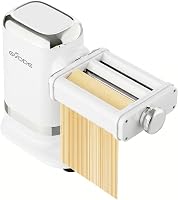
The Philips 7000 Series Pasta Maker has automatic operation, 8 discs, and a 150W motor. It can prepare up to 8 portions, so it suits family meals as well as smaller batches when you save extra pasta for later.
Automatic operation is the main difference from a crank machine. You set the program and let the machine do the mixing and pushing for you.
That suits home cooks who want fresh shapes without constant hand work.
The 8-disc set is where the variety comes from. Each disc gives a different shape, so the sauce and the meal can guide your pick.
Larger family batches are easier when the machine handles the whole cycle.
The 150W motor matters in daily use because it has to mix, knead, and extrude in one run. It is a countertop machine rather than a handheld tool, so plan for fixed space while it works.
Keep the recipe and the instructions close for the first few batches. Once the routine feels familiar, the steps become quick and steady.
What do you need before using a Philips pasta maker?
You need the machine, measured ingredients, a disc, a cutting tool, and enough counter space for setup. Read the instructions for your exact model before making the first batch.
The Philips 7000 Series includes a measuring cup and cleaning tool. Its dimensions are 12.87 in long, 9.02 in wide, and 12.68 in high, so check the available space before setting it near cabinets or other appliances.
If you're comparing automatic and manual options, start with this Pasta Makers: The Complete Buying Guide to understand the main machine types.
Which ingredients should you measure first?
Measure the dry ingredients and liquid separately before starting. Accurate measuring helps the dough reach a workable texture, while adding liquid too quickly can make the mixture harder to manage.
Use the recipe instructions for the flour and liquid combination you plan to make. The HomeID app offers step-by-step recipe guidance, including vegan and gluten-free options for the Philips 7000 Series.
Keep a small amount of extra flour available for handling the finished strands, but don't add it to the machine unless the instructions call for it. Pasta dough should be firm enough to extrude cleanly.
How do you choose and install a pasta disc?
Choose the disc for the shape you want, then install it before starting the mixing and extrusion cycle. The Philips 7000 Series includes 8 discs, giving you several shapes to use for different sauces and meals.
Check that the disc is seated correctly and that the front parts are secured before adding ingredients. A disc that isn't fitted properly can affect the shape of the pasta as it comes out.
For readers comparing extrusion systems, Best Pasta Extruder Machines explains what to consider when shape selection and extrusion are the main priorities.
How do you start the Philips pasta-making cycle?
Start the automatic program after the ingredients and disc are ready. The machine mixes the dough, kneads it, and pushes it through the selected disc for extrusion.
Add the liquid as directed by the recipe rather than pouring in extra liquid to speed up mixing. Watch the dough during the early part of the cycle so you can follow the instructions if the mixture needs attention.
The Philips 7000 Series is described as making fresh pasta in under 10 minutes. Actual preparation time also includes measuring, fitting the disc, cutting the pasta, and cleaning the parts.
How do you cut freshly extruded pasta?
Cut the strands to the length you want as they come out of the disc. Support the fresh pasta with your hand or a clean surface so the strands don't stretch under their own weight.
Dust or separate the strands according to the recipe you are using. Work in small groups if you plan to cook the pasta right away, because freshly extruded dough can cling together when left in a pile.
If you prefer rolling and cutting dough by hand, compare the process in How to Use a Pasta Attachment on a Stand Mixer?.
How should you clean a Philips pasta maker?
Clean the removable parts after the dough has been processed, using the dishwasher-safe parts and supplied cleaning tool where appropriate. Switch off the machine first and follow the instructions for removing each part.
The Philips 7000 Series has non-stick, dishwasher-safe parts. Let any dough residue firm up enough to remove cleanly, then use the cleaning tool for areas where dough remains.
Wipe the main unit according to the machine's care instructions. Keep moisture away from controls and electrical areas, and make sure parts are dry before storing or assembling the machine again.
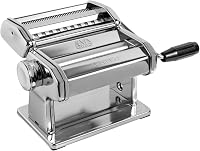
For a different cleanup routine, the MARCATO Atlas150 Manual Pasta Maker has chrome steel construction and is not dishwasher safe. Marcato describes letting it sit for 30 minutes before brushing away remaining dough residue with a dry cleaning brush.
Which Philips pasta maker is easiest for family batches?
The Philips 7000 Series is the clearest fit for family batches because it can prepare up to 8 portions in one go. Its automatic operation also reduces the need to turn a hand crank while the dough is rolled or extruded.
It has 8 discs and a maximum sheet thickness of 1.5 mm, with a minimum sheet thickness of 1 mm. The 7000 Series also has a mixing function for cookies and for starting pizza, bread, and other preparations.
Choose this machine if you want automatic mixing and extrusion, app-based recipe guidance, and dishwasher-safe parts. Its 20 lb weight and countertop dimensions make it less suitable when you need a very light machine that is easy to move after every use.
For a closer look at this model, read the Philips 7000 Series Pasta Maker review.
What are the manual alternatives?
Manual machines suit people who want to control the rolling and cutting by hand.
The MARCATO Atlas150 makes lasagna, fettuccine, and tagliolini. It has 10 settings, 3 discs, a maximum sheet thickness of 4.8 mm, and a minimum of 0.8 mm.
The Atlas150 includes a black crank handle and pasta maker. It measures 8 in long, 8 in wide, and 7 in high, and weighs 2.6 kg.
The Sailnovo 3-in-1 Pasta Maker has 9 thickness settings, from 0.5 mm to 3 mm, plus 2 pasta width options of 2.0 mm and 4.5 mm. It is manual and includes a clamp and English manual.
Choose Sailnovo if you want a lightweight manual machine with stainless steel and aluminum construction. Its blade attachment should not be washed in water or placed in a dishwasher, so it needs brush or wooden-stick cleaning instead.
A manual machine may be a better match if you want to control sheet thickness yourself. For a larger production setting, see How to Choose a Commercial Pasta Extruder.
How do you choose between automatic and manual pasta makers?
Choose the Philips 7000 Series if you want automatic mixing and extrusion, up to 8 portions, 8 discs, and dishwasher-safe parts. Choose the MARCATO Atlas150 or Sailnovo if you prefer turning a crank and controlling the dough by hand.
The Atlas150 offers 10 settings and a 150 mm maximum sheet width. Sailnovo offers 9 thickness settings and 2 cutting widths, with a maximum sheet thickness of 3 mm.
For an automatic option beyond this guide, compare Best Automatic Pasta Makers. If you already own a stand mixer, Best Stand Mixer For Pasta Dough can help you decide whether a separate pasta machine makes sense.
What is the simple Philips pasta maker routine?
The basic routine is measure, fit the disc, mix, extrude, cut, cook, and clean. Keep the recipe and machine instructions nearby until you know how the dough behaves.
Measure first, with dry ingredients and liquid kept separate. That small habit makes it easier to follow the recipe exactly.
It also stops a rush to level a cup while the machine is already running.
Fit the disc next and check that it sits firmly in place. Set the disc before adding ingredients so the shape you want is ready from the start.
A loose fit can spoil the first strands you cut.
Let the machine mix and extrude while you watch the early output. Cut the strands to length as they come out and support them so they do not stretch.
Fresh pasta left in a pile can cling together, so work in small groups.
Cook the pasta soon after cutting, or separate it well for storage. Then switch off the machine and clean the removable parts while the residue is still easy to handle.
Pick the Philips 7000 Series for automatic family-size batches and a wider choice of discs. Pick a manual machine when you want direct control over rolling, thickness, and cutting, then clean it using the method suited to its materials.
Frequently asked questions
How much pasta can a Philips pasta maker make?
The Philips 7000 Series Pasta Maker can prepare up to 8 portions in one go. Measure your ingredients with care, follow the recipe you chose, and avoid adding more flour or liquid than the machine's instructions allow.
How do you choose a disc on a Philips pasta maker?
Choose the disc that matches the pasta shape you want to serve, then fit it securely before starting the program. The Philips 7000 Series includes 8 discs, so the available shapes depend on the disc set included with your model.
How do you clean a Philips pasta maker?
Switch off the machine and remove the dough-making parts according to the instructions. The Philips 7000 Series has non-stick, dishwasher-safe parts, plus a cleaning tool for removing dough from areas that need extra attention.
Can a Philips pasta maker make more than pasta?
The Philips 7000 Series has a mixing function that Philips describes for cookies and for starting pizza and bread preparation. Follow the recipe guidance for the food you want to make, including the HomeID app's vegan and gluten-free recipes.